
Under the hood, a website AI agent is four layers stacked together, and seeing e
Under the hood, a website AI agent is four layers stacked together, and seeing each one keeps the rest of the build honest. An is software that reads your own content, follows the rules you give it, calls the tools you connect, and shows up wherever visitors already are - so a question turns into a booked meeting, a refund, a lead, or a routed handoff rather than a dead end.
Data: what the agent reads
The data layer is the agent's knowledge base - files, URLs, Notion pages, Q&A pairs, and support tickets uploaded into a source panel, with a running total against a training budget. Sources retrain on a 7-day cycle, and the API can trigger a new training run on demand.
Instructions and procedures: how the agent behaves
Instructions are the system prompt - role, tone, guardrails - edited in plain language on the same screen as the data sources. Procedures sit one layer down: numbered steps for specific jobs, such as greet, ask for the order number, decide refund or replace. Sources are the reading list, instructions are the employee handbook, procedures are the runbook for repeat tasks.
Actions and integrations: how the agent does work
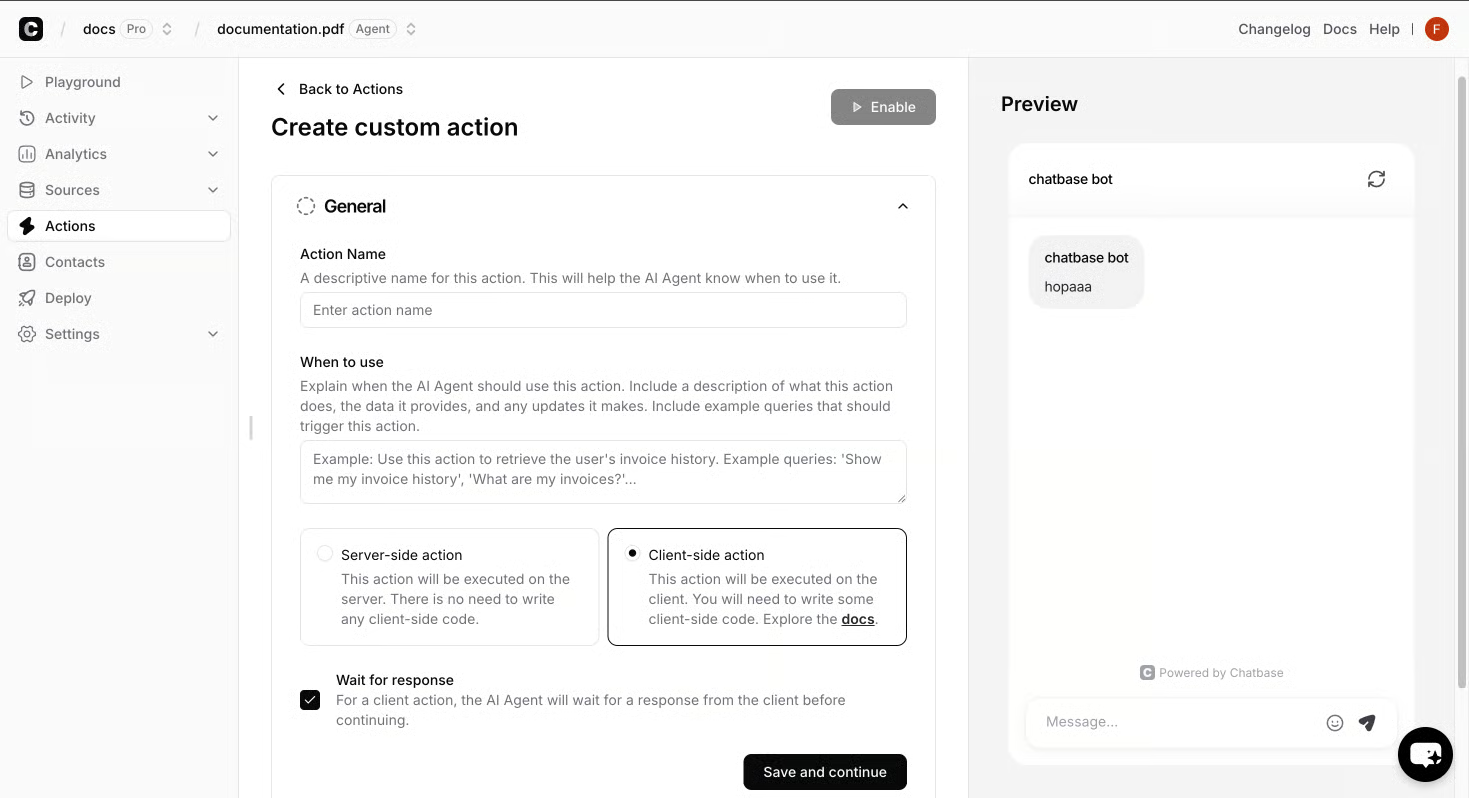
Actions are where the agent stops being a chatbot. Native actions include Calendly, Slack, Web Search, Collect Leads, and a Custom Action for any API; integrations reach further into Zendesk, Stripe, WhatsApp, Zapier, and ViaSocket so a question can end as a booked meeting, a refund processed, a lead pushed to a channel, or a ticket opened in the help desk. Identity and Contacts sit beside them so the agent can personalize replies and authorize actions for known users - the difference between a paragraph of advice and an actual outcome. Outbound campaigns bring AI Replies and Human Takeover into the same harness. The same briefing pattern scales across verticals - see for how that harness holds up outside one niche.
Channels: where the agent shows up
Build once and the agent deploys across website chat, WhatsApp, email, voice, and Slack, with an embed or API call for custom surfaces.
How the four layers connect
A visitor's message hits the widget, is matched against the data layer, is shaped by the instructions and procedures, then fires an action or routes to a human with the transcript attached. Topics, sentiment, and conversation activity flow back into analytics so instructions and procedures get refined each cycle - the feedback loop the rest of this guide assumes.
Under the hood, a website AI agent is four layers stacked together, and seeing e
Under the hood, a website AI agent is four layers stacked together, and seeing each one keeps the rest of the build honest. An is software that reads your own content, follows the rules you give it, calls the tools you connect, and shows up wherever visitors already are - so a question turns into a booked meeting, a refund, a lead, or a routed handoff rather than a dead end.
Data: what the agent reads
The data layer is the agent's knowledge base - files, URLs, Notion pages, Q&A pairs, and support tickets uploaded into a source panel, with a running total against a training budget. Sources retrain on a 7-day cycle, and the API can trigger a new training run on demand.
Instructions and procedures: how the agent behaves
Instructions are the system prompt - role, tone, guardrails - edited in plain language on the same screen as the data sources. Procedures sit one layer down: numbered steps for specific jobs, such as greet, ask for the order number, decide refund or replace. Sources are the reading list, instructions are the employee handbook, procedures are the runbook for repeat tasks.
Actions and integrations: how the agent does work
Actions are where the agent stops being a chatbot. Native actions include Calendly, Slack, Web Search, Collect Leads, and a Custom Action for any API; integrations reach further into Zendesk, Stripe, WhatsApp, Zapier, and ViaSocket so a question can end as a booked meeting, a refund processed, a lead pushed to a channel, or a ticket opened in the help desk. Identity and Contacts sit beside them so the agent can personalize replies and authorize actions for known users - the difference between a paragraph of advice and an actual outcome. Outbound campaigns bring AI Replies and Human Takeover into the same harness. The same briefing pattern scales across verticals - see for how that harness holds up outside one niche.
Channels: where the agent shows up
Build once and the agent deploys across website chat, WhatsApp, email, voice, and Slack, with an embed or API call for custom surfaces.
How the four layers connect
A visitor's message hits the widget, is matched against the data layer, is shaped by the instructions and procedures, then fires an action or routes to a human with the transcript attached. Topics, sentiment, and conversation activity flow back into analytics so instructions and procedures get refined each cycle - the feedback loop the rest of this guide assumes.
Under the hood, a website AI agent is four layers stacked together, and seeing e
Under the hood, a website AI agent is four layers stacked together, and seeing each one keeps the rest of the build honest. An is software that reads your own content, follows the rules you give it, calls the tools you connect, and shows up wherever visitors already are - so a question turns into a booked meeting, a refund, a lead, or a routed handoff rather than a dead end.
Data: what the agent reads
The data layer is the agent's knowledge base - files, URLs, Notion pages, Q&A pairs, and support tickets uploaded into a source panel, with a running total against a training budget. Sources retrain on a 7-day cycle, and the API can trigger a new training run on demand. Agents are only as good as the content you point them at, so the training corpus is a first-class input rather than a settings toggle.
Instructions and procedures: how the agent behaves
Instructions are the system prompt - role, tone, guardrails - edited in plain language on the same screen as the data sources. Procedures sit one layer down: numbered steps for specific jobs, such as greet, ask for the order number, decide refund or replace. That split is what lets the same harness behave as a support agent on one site and a product-guidance agent on another without writing code. Sources are the reading list, instructions are the employee handbook, procedures are the runbook for repeat tasks - a briefing shape that carries into the launch moves below.
Actions and integrations: how the agent does work
Actions are where the agent stops being a chatbot. Native actions include Calendly, Slack, Web Search, Collect Leads, and a Custom Action for any API; integrations reach further into Zendesk, Stripe, WhatsApp, Zapier, and ViaSocket so a question can end as a booked meeting, a refund processed, a lead pushed to a channel, or a ticket opened in the help desk. Identity and Contacts sit beside them so the agent can personalize replies and authorize actions for known users - the difference between a paragraph of advice and an actual outcome. The same briefing shape scales beyond one niche - see for how that harness holds up across verticals.
Channels: where the agent shows up
Build once and the agent deploys across website chat, WhatsApp, email, voice, and Slack, with an embed or API call for custom surfaces.
How the four layers connect
A visitor's message hits the widget, is matched against the data layer, is shaped by the instructions and procedures, then fires an action or routes to a human with the transcript attached. Topics, sentiment, and conversation activity flow back into analytics so instructions and procedures get refined each cycle - the feedback loop the rest of this guide assumes.
Under the hood, a website AI agent is four layers stacked together, and seeing e
Under the hood, a website AI agent is four layers stacked together, and seeing each one keeps the rest of the build honest. An is software that reads your own content, follows the rules you give it, calls the tools you connect, and shows up wherever visitors already are - so a question turns into a booked meeting, a refund, a lead, or a routed handoff rather than a dead end.
Data: what the agent reads
The data layer is the agent's knowledge base - files, URLs, Notion pages, Q&A pairs, and support tickets uploaded into a source panel, with a running total against a training budget. Sources retrain on a 7-day cycle, and the API can trigger a new training run on demand. Agents are only as good as the content you point them at, so the training corpus is a first-class input rather than a settings toggle.
Instructions and procedures: how the agent behaves
Instructions are the system prompt - role, tone, guardrails - edited in plain language on the same screen as the data sources. Procedures sit one layer down: numbered steps for specific jobs, such as greet, ask for the order number, decide refund or replace. That split is what lets the same harness behave as a support agent on one site and a product-guidance agent on another without writing code. Sources are the reading list, instructions are the employee handbook, procedures are the runbook for repeat tasks - a briefing shape that carries into the launch moves below.
Actions and integrations: how the agent does work
Actions are where the agent stops being a chatbot. Native actions include Calendly, Slack, Web Search, Collect Leads, and a Custom Action for any API; integrations reach further into Zendesk, Stripe, WhatsApp, Zapier, and ViaSocket so a question can end as a booked meeting, a refund processed, a lead pushed to a channel, or a ticket opened in the help desk. Identity and Contacts sit beside them so the agent can personalize replies and authorize actions for known users - the difference between a paragraph of advice and an actual outcome. The same briefing shape scales beyond one niche - see for how that harness holds up across verticals.
Channels: where the agent shows up
Build once and the agent deploys across website chat, WhatsApp, email, voice, and Slack, with an embed or API call for custom surfaces.
How the four layers connect
A visitor's message hits the widget, is matched against the data layer, is shaped by the instructions and procedures, then fires an action or routes to a human with the transcript attached. Topics, sentiment, and conversation activity flow back into analytics so instructions and procedures get refined each cycle - the feedback loop the rest of this guide assumes.
Under the hood, a website AI agent is four layers stacked together, and seeing e
Under the hood, a website AI agent is four layers stacked together, and seeing each one keeps the rest of the build honest. An is software that reads your own content, follows the rules you give it, calls the tools you connect, and shows up wherever visitors already are - so a question turns into a booked meeting, a refund, a lead, or a routed handoff rather than a dead end.
Data: what the agent reads
The data layer is the agent's knowledge base - files, URLs, Notion pages, Q&A pairs, and support tickets uploaded into a source panel, with a running total against a training budget. Sources retrain on a 7-day cycle, and the API can trigger a new training run on demand. Agents are only as good as the content you point them at, so the training corpus is a first-class input rather than a settings toggle.
Instructions and procedures: how the agent behaves
Instructions are the system prompt - role, tone, guardrails - edited in plain language on the same screen as the data sources. Procedures sit one layer down: numbered steps for specific jobs, such as greet, ask for the order number, decide refund or replace. That split is what lets the same harness behave as a support agent on one site and a product-guidance agent on another without writing code. Sources are the reading list, instructions are the employee handbook, procedures are the runbook for repeat tasks - a briefing shape that carries into the launch moves below.
Actions and integrations: how the agent does work
Actions are where the agent stops being a chatbot. Native actions include Calendly, Slack, Web Search, Collect Leads, and a Custom Action for any API; integrations reach further into Zendesk, Stripe, WhatsApp, Zapier, and ViaSocket so a question can end as a booked meeting, a refund processed, a lead pushed to a channel, or a ticket opened in the help desk. Identity and Contacts sit beside them so the agent can personalize replies and authorize actions for known users - the difference between a paragraph of advice and an actual outcome.
Channels: where the agent shows up
Build once and the agent deploys across website chat, WhatsApp, email, voice, and Slack, with an embed or API call for custom surfaces. The voice channel is recent: the August 2026 Changelog adds SIP trunking so an existing phone number can be pointed at the agent.
How the four layers connect
A visitor's message hits the widget, is matched against the data layer, is shaped by the instructions and procedures, then fires an action or routes to a human with the transcript attached. Topics, sentiment, and conversation activity flow back into analytics so instructions and procedures get refined each cycle - the feedback loop the rest of this guide assumes.