

What an AI agent for your website actually does
An AI agent for your website is more than a chat widget. It is software that uses your company's own data as a knowledge base, takes real actions on a visitor's behalf, and feeds outcomes back into the systems your team already runs. Where a traditional chatbot matches keywords and returns scripted answers, an agent grounds itself in your content and tools, then decides what to say and which step to take next.
On a typical site that translates into three jobs running side by side. It resolves support questions like order status, return policy, sizing, or account changes by reading the question and pulling the answer from your help docs, catalog, or back-office record. It qualifies and captures leads by asking the right follow-ups, collecting contact details, and routing high-intent visitors to a calendar, a CRM, or a sales inbox. And it guides product discovery, helping shoppers compare options, understand specs, and move toward the right item before they drop off.
Two patterns show up often once an agent is live. AI Replies lets the agent handle routine conversations end to end on its own, drawing on your knowledge and actions to close the loop without a human touching the keyboard. Human Takeover hands the same conversation to a teammate when the agent detects a case it should not resolve alone - a billing dispute, a refund exception, a sensitive account change - and the human can step in mid-conversation without losing context. Pairing the two is what turns a chat widget into an agent that actually closes tickets.
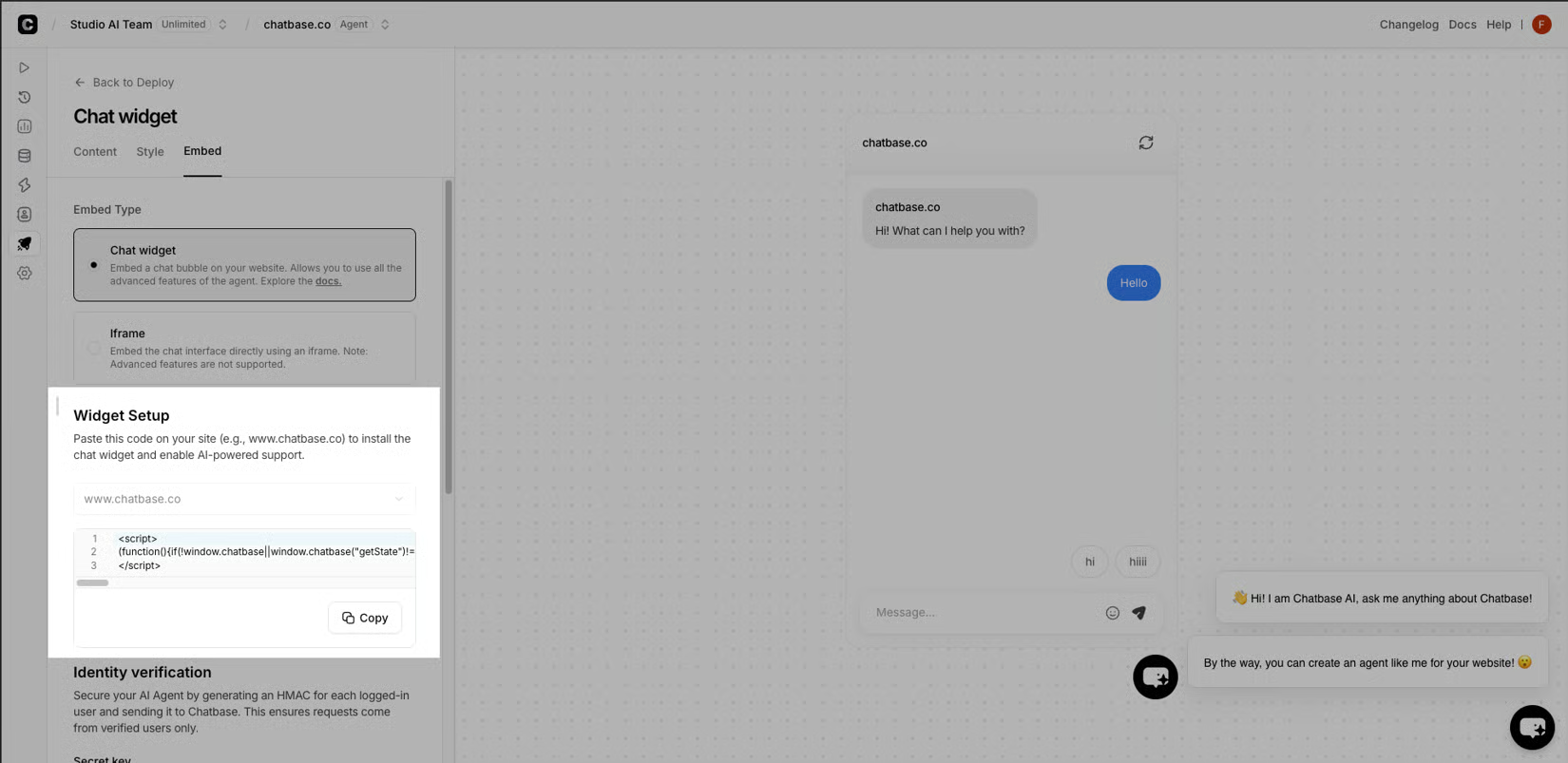
In short, a website AI agent is the layer between a visitor's question and a real outcome - answering with your content, acting through your tools, and handing off to a person only when the situation calls for one.
Where an AI agent fits on a website (chat, email, voice, in-app)
The same agent runs as a widget on your website, in email, on voice, in-app, and across Instagram, Messenger, WhatsApp, and Slack, so the same answers follow the visitor from one surface to the next.
How to build and launch a website AI agent in minutes
The lifecycle is build, test, deploy, optimize. Connect data sources, set guardrails, run real scenarios, then publish across channels.
Step 1: Build with the sources you trust
Connect the knowledge sources the agent should know: files, pages, help center articles, Notion docs, and custom Q&A pairs. Layer on actions like Calendly, Slack, Web Search, Collect Leads, and a Custom Action for any API, then add identity and verified Contacts so the agent recognizes a known user. Close the loop with a short set of plain-language instructions covering greetings, in-scope topics, and escalation rules. Two settings decide how the agent behaves once it's live: AI Replies lets it close routine conversations on its own, while Human Takeover routes anything sensitive - billing, refunds, account changes - to a teammate mid-thread without losing context.
Step 2: Test against real scenarios
Feed the agent sizing questions, order-status lookups, refund language, and lead-capture flows, and check that it grounds responses in your content, takes the right action, and hands off cleanly. Use the same stage to tune guardrails - what to refuse, what needs identity verification, and which topics route straight to a human. Teams working through an AI agent platform for their site spend most of their iteration time here.
Step 3: Deploy across every channel with one click
Publish the agent as a widget on the website, inside the help center, on WhatsApp, Slack, Instagram, Messenger, in-app, or as a voice agent on phone calls. The same knowledge and actions follow it everywhere, so a chat widget and a phone line do not drift into two different bots. Embeds and API calls cover surfaces that need a custom front end.
Step 4: Optimize from real conversations
Use Topics, chat activity, sentiment, and resolution signals to see which topics the agent closes, which it escalates, and where visitors drop off. Expand knowledge and actions for topics that keep returning to humans, and confirm the cases that belong to a person permanently. The result is an agent that improves with every conversation instead of quietly drifting out of date.
When to keep a human in the loop and when to let the agent run
Not every conversation belongs to the agent, and not every conversation needs a person. The job is to draw the line so the agent handles what it can close confidently and escalates everything else without losing the thread.
When the agent runs end to end
The agent is the right owner for the bulk of inbound traffic - sizing and fit questions on a product page, shipping and return policy lookups, "where is my order" checks against a verified contact, appointment scheduling through Calendly, lead qualification and capture, and routine recommendations drawn from your catalog and help docs. Two settings decide how the agent behaves in this mode: AI Replies lets it close routine conversations on its own, drawing on your knowledge and actions to resolve the thread without a human touching the keyboard, while Human Takeover routes anything sensitive - billing disputes, refund exceptions, account changes that touch verified identity - to a teammate mid-conversation without losing context. The lifecycle supports this hands-off mode: build the agent against your sources, test it against real scenarios across every channel, deploy with a single click, and optimize from resolution rates, escalations, and sentiment in analytics. When those signals stay inside the thresholds you set, the agent keeps running on its own and pushes outcomes back into Zendesk, Stripe, Slack, WhatsApp, or your CRM through integrations like Zapier and ViaSocket.
When a human takes over
A handful of cases should never be auto-resolved, and the agent needs a clean way to hand them off mid-conversation. Billing disputes, refund exceptions, account changes that touch verified identity, compliance-sensitive requests, and any thread where the visitor explicitly asks for a person are all candidates for Human Takeover. The handoff is most useful when it carries the full context - the visitor's question, what the agent already tried, and the verified contact record - so the teammate picking it up does not start from scratch. Teams shaping an AI agent platform for their site usually pair automation with the right human moments rather than treating the two as a tradeoff.
How to set the line
Start with categories you will not let it close on its own - refunds, cancellations, account deletion, anything involving regulated data - and add a fallback that escalates when confidence is low, when the visitor asks for a person, or when the action is outside what you have connected. Review the escalation queue on a set cadence, expand the agent's knowledge for topics that keep returning to humans, and confirm which cases belong to a person permanently.