
What an AI agent for your website actually is
The clearest way to think about it is this: a modern website AI agent is not a rule-based chatbot with prewritten buttons. It is a trained assistant that reads your site, help center, documents, and FAQs, then responds in natural language. When a question is routine - return windows, sizing, plan limits, shipping cutoffs - it answers on its own. When a request needs context it does not have, or a customer asks for a person, it hands off through the channel you already use, with the conversation history attached (AI Agent for Website: What It Is, What It Does, and How to Launch One) (About).
Inside Chatbase, that shift is described as moving from chat to agentic behavior: the agent uses your data as a knowledge base, takes real actions through your tools, and feeds measurable outcomes back into your support, marketing, and sales stacks. The same lifecycle - build, test, deploy, optimize - applies whether the agent is greeting a shopper, qualifying a B2B lead, or walking a student through program options.
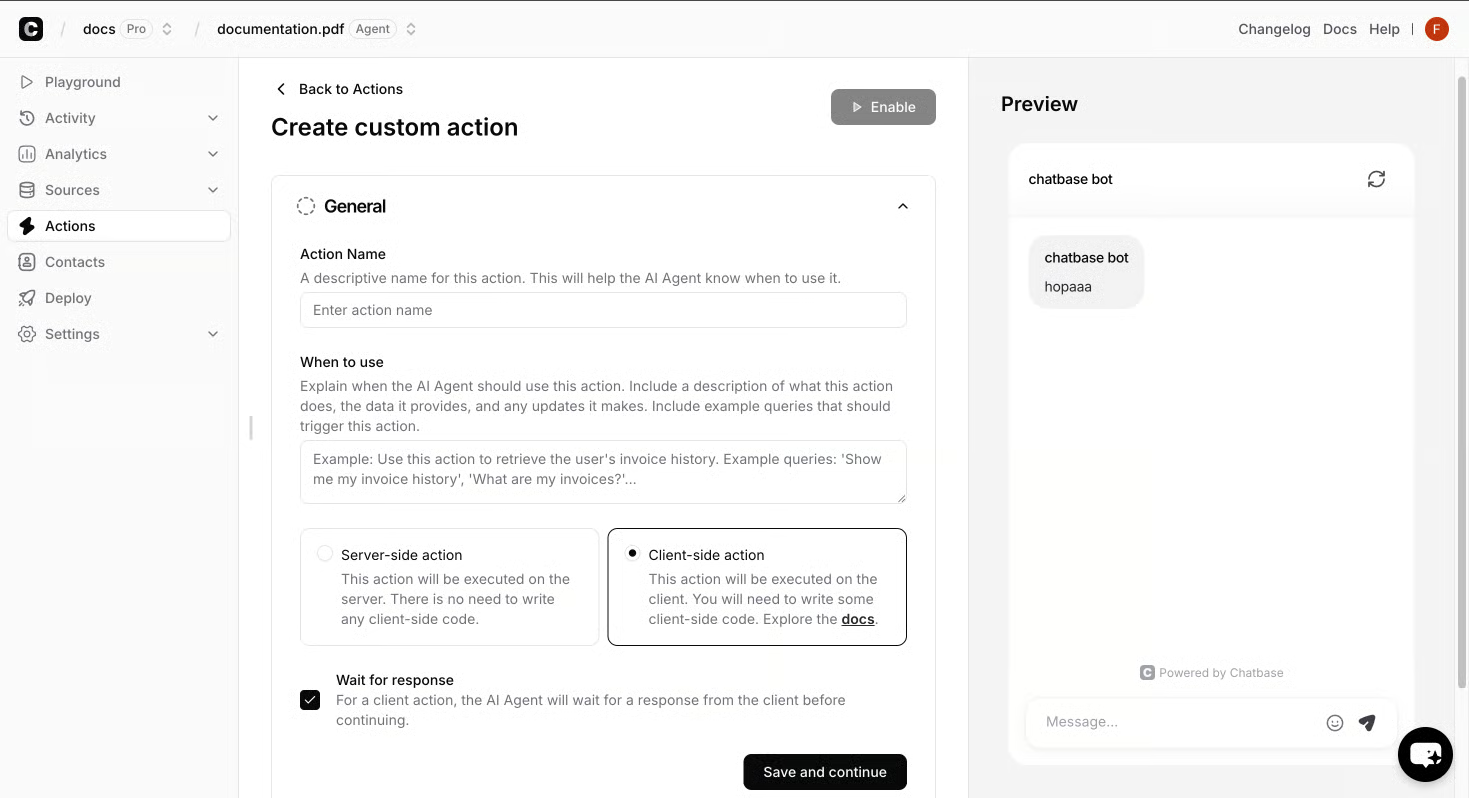
The practical difference matters for buyers. A scripted chatbot answers from a fixed tree and falls over on anything it was not programmed to expect. An AI agent answers from your real content, holds multi-turn context, and can be retrained in minutes when a policy changes or a product launches. Three properties define the category: the agent is grounded in your content, it can act (not just reply) by calling Calendly, Stripe, Zendesk, Slack, your CRM, or any API through a Custom Action, and every conversation produces resolution rates, escalation topics, sentiment, and lead captures you can export.
What an AI agent can do on a website
On a live site, a website AI agent shows up as a conversation, but the work behind that conversation is wider than chat. In Chatbase, an AI Agent is built to greet visitors, answer product and policy questions from your own content, qualify leads, capture contact details, route complex requests to a human on your existing channels, and push outcomes into the tools you already pay for - all in one continuous flow rather than a tree of scripted buttons.
The day-to-day jobs fall into a handful of categories. Support agents deflect repetitive tickets - return windows, sizing, plan limits, shipping cutoffs - and escalate the rest to Zendesk, Slack, or a human inbox with the conversation attached. Sales agents engage prospects, answer pricing and feature questions, and book meetings through Calendly when intent is real. Product guidance agents help shoppers and users find the right option from your catalog or docs. Across all three, the same mechanics apply: ground every answer in your data, take real actions through your tools, and hand off to a person when the request needs a human.
Take actions, not just answer questions
Actions include built-in moves like Calendly, Slack, Web Search, Collect Leads, and Custom Button, plus Custom Actions that call any API endpoint - so a trained assistant can verify a subscription, file a ticket, or alert a channel the moment intent is real.
Capture leads and route the rest to a human
Qualified intent flows straight into your CRM or spreadsheet; anything that needs a person goes to your existing channel with the transcript attached. The How Digital Marketing Teams Use AI Agents to Scale Acquisition and Support piece walks through how that same pattern shows up on marketing sites, where qualifying and routing matter as much as answering (How Chatbase Deployed AI Agents Across Ecommerce, Media, and Fintech: Customer Stories and Results) (Beyond Clicks: How Strategic Digital Marketing Drives Real Business Growth).
How an AI agent works: sources, actions, and analytics
Behind every Chatbase agent sit the building blocks that turn a single conversation into the next one: Sources, Actions, and Analytics. Each one has a specific job, and each one feeds the loop that keeps the agent grounded in your content rather than a fixed script.
Sources feed the agent the content it is allowed to answer from. Chatbase accepts files, public URLs, Notion pages, and a custom Q&A list, which covers the bulk of what a support, sales, or product guidance agent needs to draw on. When a policy changes or a product launches, you update the source and the agent picks up the new answer on the next turn.
Actions include built-in moves like Calendly, Slack, Web Search, Collect Leads, and Custom Button. Custom Actions extend the layer by calling any API endpoint, so a trained assistant can verify a subscription, file a ticket, or alert a channel the moment intent is real. Analytics surface Topics, Sentiment, resolution rates, and exports for every conversation, so each conversation refines the next. Inside Chatbase, the same Topics, Sentiment, and resolution data drive the next round of Sources and Instructions edits, so the agent stops being a widget and starts being a layer you can actually measure. The AI-Powered Agents in Digital Marketing: Deployment, Training, and Analytics piece shows how that same action layer shows up on marketing sites, where qualifying and routing matter as much as answering (Why this typography has so much importance) (Hello, world).
How to launch an AI agent on your website
Launching an agent on your own site follows the same lifecycle the AI Agent for Website Playbook lays out: build, test, deploy, optimize. Each step has a clear output you can evaluate before moving to the next.
1. Build - connect your data and define the role
Feed the agent the content it should answer from (files, URLs, Notion pages, a custom Q&A list) and set its role in the Instructions panel: what it represents, who it serves, and how it responds.
2. Test - run real scenarios before going live
Run the agent against the questions your team already answers by hand (return windows, pricing objections, plan limits, shipping cutoffs, sizing, eligibility) and adjust Instructions or Sources where answers drift from policy.
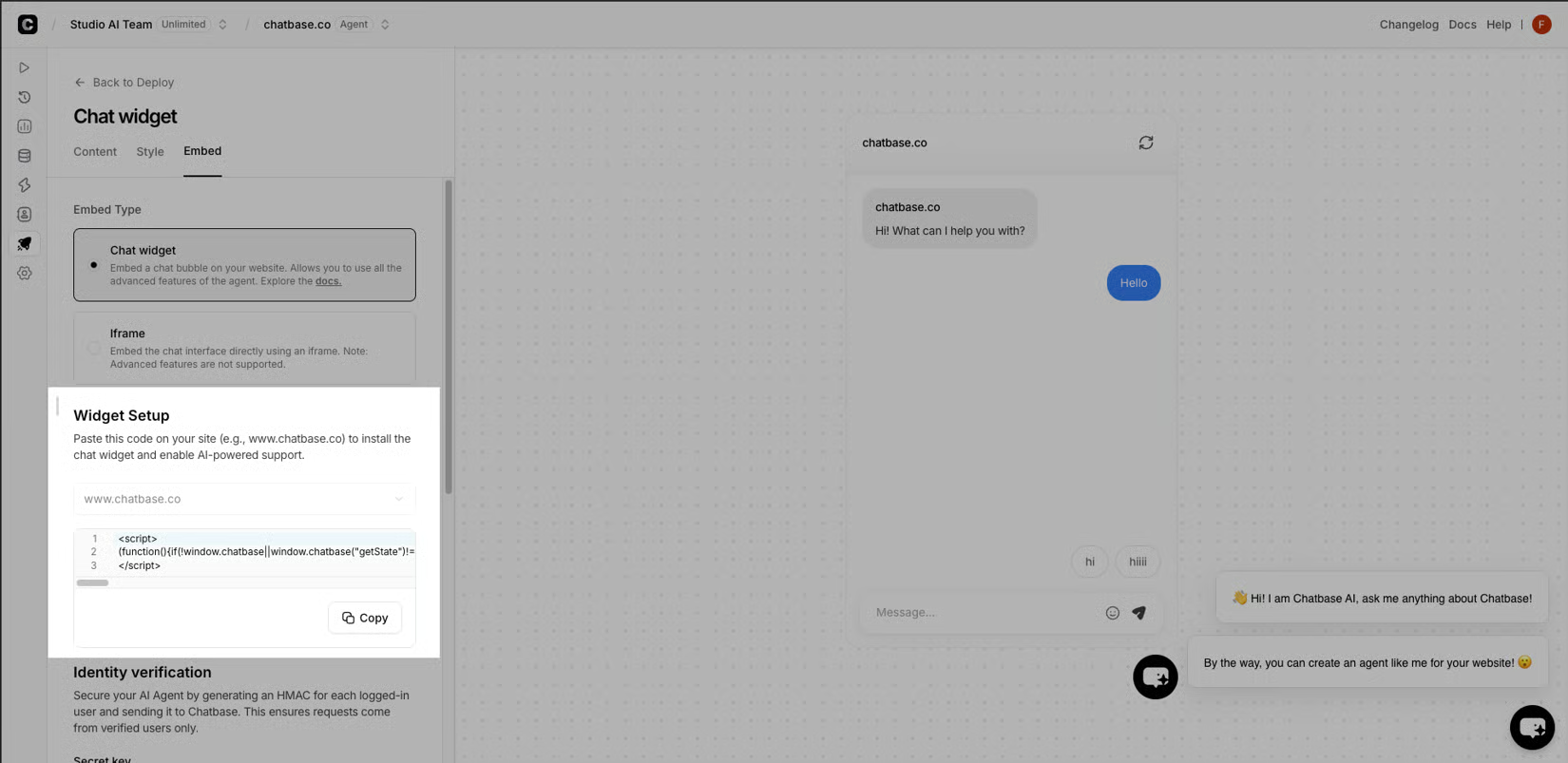
3. Deploy - embed the widget or call the API
Publishing drops a widget on your site, with embed or iframe options and an API for headless setups, so the same trained agent can run across chat, email, and voice.
4. Optimize - measure and refine
Analytics surface Topics, Sentiment, resolution rates, and exports; review escalations, refine Sources or Instructions, and re-test before pushing changes.