
An AI agent for a website is software that lives on your site and does more than answer scripted questions. It reads the visitor's intent, pulls an answer from your own content, and takes the next step - booking a demo, opening a ticket, qualifying a lead, or handing the conversation to a human with full context. Chatbase describes this shift as the move from chat to agentic: an agent that resolves an issue end to end instead of leaving the customer to file a ticket and wait (AI Agent for Website: What It Is, How It Works, and How to Launch One).
A traditional website chatbot matches keywords and walks a visitor down a decision tree. An AI agent for a website grounds its replies in your real knowledge - help center articles, product catalogs, policy pages, internal docs - and decides what to do from there. Chatbase's own materials frame the difference as four working jobs: use your company's data as the knowledge base, take real actions on the visitor's behalf, push outcomes into tools like Zendesk, Stripe, or your CRM, and learn from the conversations that follow (agents.divvylore.com).
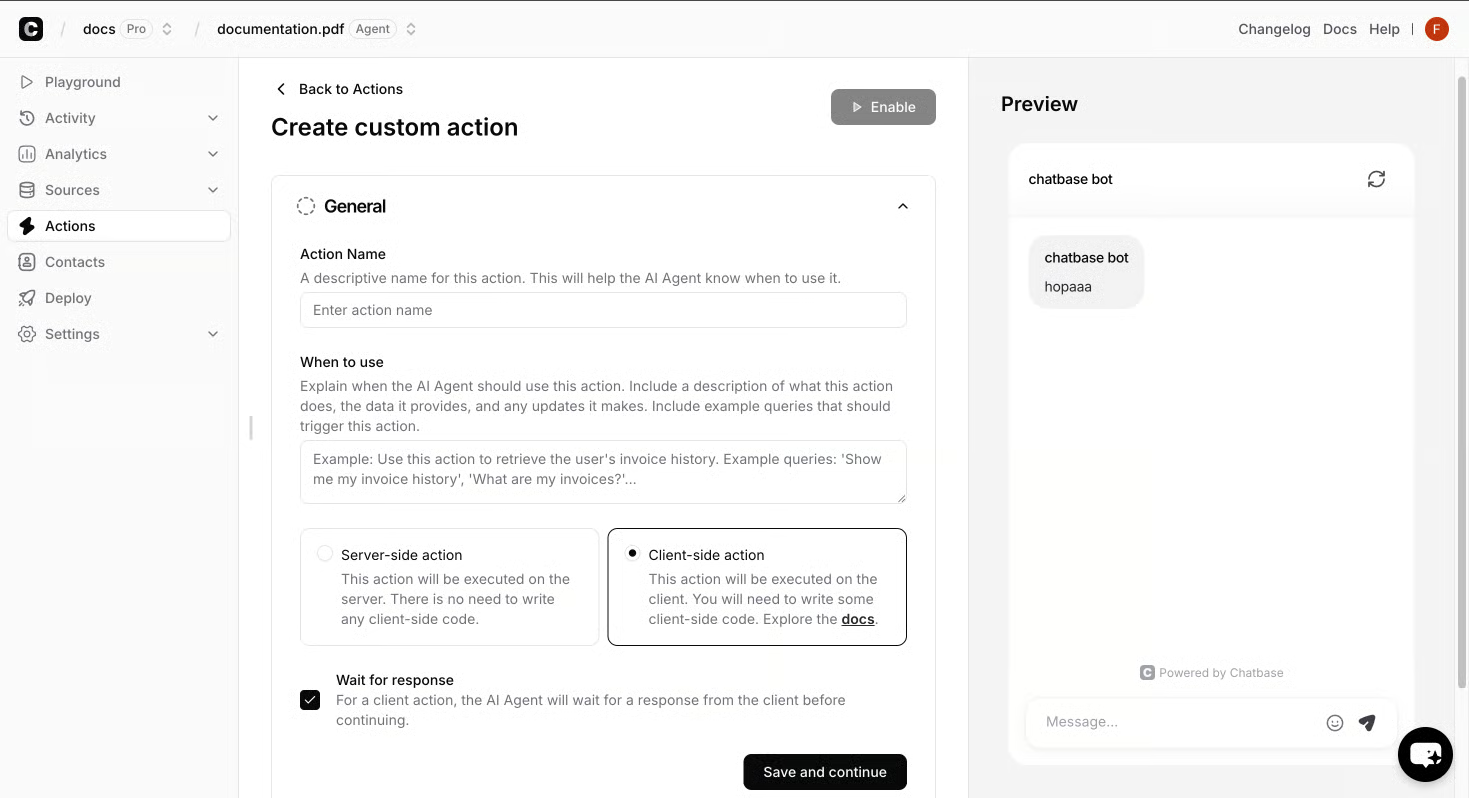
That second job - taking action - is the clearest line between an agent and a chatbot. A chatbot replies; an agent can check an order, send a Slack alert, update a record, or route the visitor to the right human. The Chatbase playbook lists the built-in moves directly: Calendly, Slack, Web Search, Collect Leads, and a Custom Action that calls any API, plus identity and contacts so a verified user can safely trigger actions against their own data (AI Agent for Website: What It Is, What It Does, and How to Launch One).
Three behaviors define the role on a live site: (Hello, world)
- Resolves, then acts. It answers the question and completes the next step - a return, a booking, a handoff - inside the same conversation.
- Speaks in the brand's voice. Instructions, accent color, and tone are set at build time, so every reply stays consistent (Beyond Clicks: How Strategic Digital Marketing Drives Real Business Growth).
- Reports back. Topics, sentiment, resolution rates, and escalations feed analytics so the team can see where the agent is winning and where it needs new training data AI-Powered Agents in Digital Marketing: Deployment, Training, and Analytics.
In Chatbase's positioning, this is the same role across industries: support agent, sales agent, and product guidance agent running from one build, deployed across web chat, email, WhatsApp, Slack, and voice. The lifecycle stays the same too - build, test, deploy, optimize - so the agent gets more accurate with every conversation instead of going stale (How Digital Marketing Teams Use AI Agents to Scale Acquisition and Support).
For a fuller picture of how this plays out across retail, travel, financial services, and tech, see AI Agent for Website: What It Is, How It Works, and How to Launch One.
An AI agent for a website is software that lives on your site and does more than answer scripted questions. It reads the visitor's intent, pulls an answer from your own content, and takes the next step - booking a demo, opening a ticket, qualifying a lead, or handing the conversation to a human with full context. Chatbase describes this shift as the move from chat to agentic: an agent that resolves an issue end to end instead of leaving the customer to file a ticket and wait AI Agent for Website: What It Is, How It Works, and How to Launch One (How Chatbase Deployed AI Agents Across Ecommerce, Media, and Fintech: Customer Stories and Results).
A traditional website chatbot matches keywords and walks a visitor down a decision tree. An AI agent for a website grounds its replies in your real knowledge - help center articles, product catalogs, policy pages, internal docs - and decides what to do from there. Chatbase's own materials frame the difference as four working jobs: use your company's data as the knowledge base, take real actions on the visitor's behalf, push outcomes into tools like Zendesk, Stripe, or your CRM, and learn from the conversations that follow.
That second job - taking action - is the clearest line between an agent and a chatbot. A chatbot replies; an agent can check an order, send a Slack alert, update a record, or route the visitor to the right human. The Chatbase playbook lists the built-in moves directly: Calendly, Slack, Web Search, Collect Leads, and a Custom Action that calls any API, plus identity and contacts so a verified user can safely trigger actions against their own data.
Three behaviors define the role on a live site:
- Resolves, then acts. It answers the question and completes the next step - a return, a booking, a handoff - inside the same conversation.
- Speaks in the brand's voice. Instructions, accent color, and tone are set at build time, so every reply stays consistent (About).
- Reports back. Topics, sentiment, resolution rates, and escalations feed analytics so the team can see where the agent is winning and where it needs new training data Why this typography has so much importance Why this typography has so much importance Why this typography has so much importance.
An AI agent for a website is software that lives on your site and does more than answer scripted questions. It reads the visitor's intent, grounds replies in your own content, and takes the next step. Chatbase describes this shift as the move from chat to agentic: an agent that resolves an issue end to end instead of leaving the customer to file a ticket and wait, as covered in AI Agent for Website: What It Is, What It Does, and How to Launch One.
A traditional website chatbot matches keywords and walks a visitor down a decision tree. An AI agent for a website grounds its replies in your real knowledge - help center articles, product catalogs, policy pages, internal docs - and decides what to do from there. Chatbase's own materials frame the difference as four working jobs: use your company's data as the knowledge base, take real actions on the visitor's behalf, push outcomes into tools like Zendesk, Stripe, or your CRM, and learn from the conversations that follow.
That second job is the clearest line between an agent and a chatbot: a chatbot replies; an agent routes the visitor to the right human with full context. The Chatbase playbook lists the built-in actions directly - Calendly, Slack, Web Search, Collect Leads, and a Custom Action that calls any API - and Identity and Contacts let a verified user safely trigger actions against their own data.
Three behaviors define the role on a live site:
- Resolves, then acts. It answers the question and completes the next step - a return, a booking, a handoff - inside the same conversation.
- Speaks in the brand's voice. Instructions, accent color, and tone are set at build time, so every reply stays consistent.
- Reports back. Topics, sentiment, resolution rates, and escalations feed analytics so the team can see where the agent is winning and where it needs new training data.
In Chatbase's positioning, this is the same role across industries: a support agent that resolves queries and escalates to Zendesk with auto-tagging; a sales agent that answers pricing and books via Calendly; and a product guidance agent that explains the catalog in an on-brand voice - all from one build, deployed across web chat, email, WhatsApp, Slack, and voice.
The Jobs One Build Handles on a Live Site
The same Chatbase build runs as three roles on a live site: a support agent that resolves queries and escalates to Zendesk with auto-tagging; a sales agent that answers pricing and books via Calendly; a product guidance agent that explains the catalog in an on-brand voice.
The moves that turn a reply into an outcome
The built-in actions drive those outcomes: Calendly, Slack, Web Search, Collect Leads, and a Custom Action that calls any API. Identity and Contacts sit alongside them, so a verified user can safely trigger actions against their own data. That action layer is the clearest line between an agent and a chatbot on a website: a chatbot replies; an agent routes the visitor to the right human with full context.
A reply becomes an outcome when the conversation does more than inform. Chatbase lists the built-in actions directly: Calendly, Slack, Web Search, Collect Leads, and a Custom Action that can call any API endpoint. Identity and Contacts sit alongside them, so a verified user can safely trigger actions against their own data. A chatbot replies; an agent routes the visitor to the right human with full context.